How to Log On as an Internal User
An Internal user logs into the NH MMIS Health Enterprise Portal to access secure information regarding members, providers, claims, benefits, third party liabilities and service authorizations. Some of the functions you can perform as a provider are: checking a member's eligibility, entering claims, correcting claims, reviewing financial data, reviewing service authorizations, etc.
Logging into the NH MMIS Health Enterprise Portal requires the user to enter a captcha code (characters displayed in a picture format). It is used to verify the entered user ID and password before the internal user is authenticated.
Note: If your organization or practice has registered, then please obtain a user name and password from your Organization Administrator. Otherwise, please register to establish an account for your organization or practice.
To log in as an internal user
-
On the public Home page, in the Sign In pod, click Internal User.
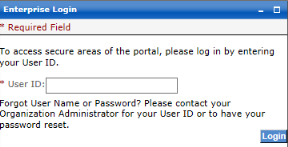
The Internal User Login page is displayed.
-
On the Enterprise Login page, do the following:
-
Enter your User ID.
 See image
Tip: If you forget your User ID contact your Organization Administrator to reset your password.
-
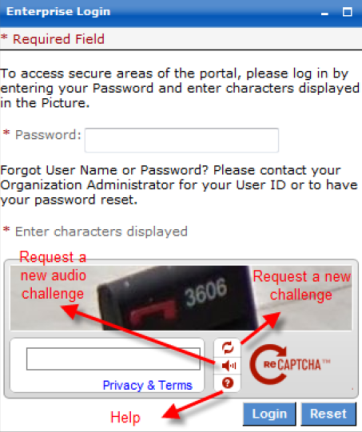
Enter your Password.
See imageTip: If you forget your password contact your Organization Administrator to reset your password. The Organization Administrator who forgot their User ID or password should call the Provider Relations Unit.
 Caution: Do not save your NH MMIS password even if prompted by your internet browser.
 -
In the Type the text box, enter the displayed Captcha Code.
Tip: If you are having difficulty identifying the characters that are displayed, you can request a new Captcha phrase by hitting the double arrow button or by reading it aloud by pressing the audio speaker button, or by pressing the question mark button.
-
-
Click Login.
The Internal User Home page is displayed.
Note: If your NH MMIS Health Enterprise Portal session times out automatically (after 30 minutes of inactivity, by default), you can repeat these steps to log in again.
 See Also